
For a while now, I've had this one thing sitting in the back of my head.
What if I could run an AI model on my own laptop? No API. No cloud. No tokens being counted somewhere. Just a model running locally, on my hardware, offline.
I'd read about it. Seen people talk about it. But every time I looked into it, the hardware requirements pushed me back — you need a decent GPU, enough RAM, the right setup. My laptop at the time wasn't there yet.
So I did something about it. I upgraded the RAM to 16GB.
Not just for this. I had other reasons too. But this was sitting in the list. And once it was done, the first thing I wanted to test was exactly this — host a local model and see what it actually feels like to use one.
Finding Ollama
If you start searching for "run LLM locally," you'll find a few tools. The one that kept coming up was Ollama.
It's the simplest way to describe it: Ollama is like Docker, but for AI models. You pull a model with one command. It runs as a local server. You talk to it through a REST API or a terminal prompt. That's it.
No Python environment to configure. No CUDA setup. No dependencies to wrestle with.
ollama pull qwen2.5-coder:3b
ollama run qwen2.5-coder:3b
Two commands. That's the whole install-and-run.
The model I chose — qwen2.5-coder:3b — is a 3 billion parameter model built specifically for code. Made by Alibaba's Qwen team. About 1.8 GB to download. It fit comfortably within my GPU's 4GB VRAM.
The First Surprise
Once it was running, I opened Task Manager out of habit. Checked GPU utilization.
It showed 0%.
My first thought: something's wrong. It's not using the GPU. It must be running on CPU.
I almost went down a rabbit hole of trying to fix it. But instead I ran one command:
ollama ps
NAME                  PROCESSOR    SIZE
qwen2.5-coder:3b      100% GPU     2.4 GB
100% GPU. It was on the GPU the whole time.
The 0% in Task Manager wasn't wrong — the GPU actually does idle at 0% between responses. It spikes during the few seconds it's generating text, then drops back down. Task Manager refreshes too slowly to catch it.
This was the first real lesson: the tool you use to check matters more than what you think you're seeing.
Ollama's own ollama ps is the right place to check what's actually happening, not Task Manager.
What 16GB RAM Actually Means When You're Working
Here's something I didn't think about until I saw it play out in real time.
I upgraded to 16GB RAM. Good. But by the time Windows, the browser, PyCharm, and everything else I had open took their share — I had about 2.6 GB free for the model.
Over a couple of hours of working, that dropped further. 2.0 GB. Then 1.6 GB.
The 3B model I chose uses about 2.4 GB. It was fine — it was loaded on the GPU, not eating into RAM. But if I had tried to run a 7B model (which needs about 5 GB free), it would have pushed into virtual memory and slowed everything down.
16GB is enough. But just enough. And it depends on what else you have open.
This is the kind of thing you don't know until you're actually sitting in your working environment with everything running. The benchmarks assume a clean machine. Real machines are not clean.
What It Was Actually Like to Use
I connected the model to PyCharm through a plugin called Continue. Once it was working, I had a local AI assistant inside my IDE. No internet required.
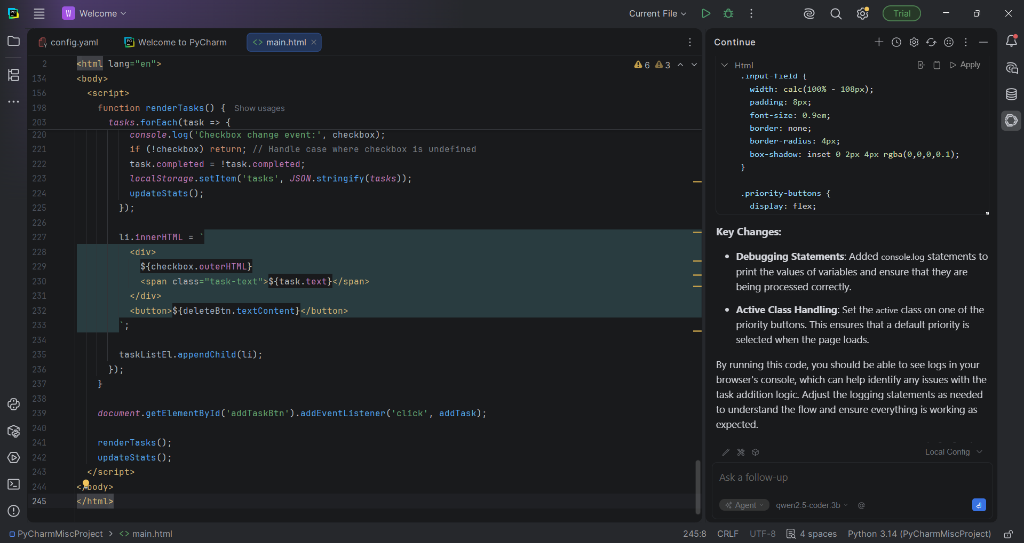
For the things it's built for — writing functions, completing code, explaining what something does — it worked well. I asked it to write a Python function for calculating a moving average. It gave back clean, correct code with proper edge case handling. First try.
Where it struggled was when I pushed it too hard. I gave it a long, complex prompt asking it to generate a full UI component — multiple sections, specific layout, styling, interactivity. The output had structural problems. Things were missing. The layout wasn't right.
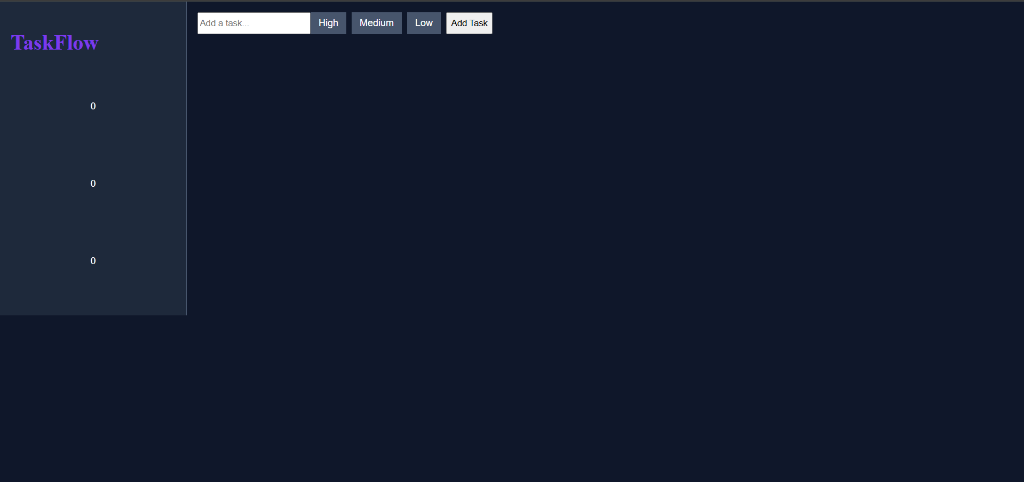
This isn't really a failure of the model. It's a constraint of running a 3 billion parameter model on consumer hardware. The context window is limited. Long, complex prompts hit that limit. The fix is straightforward once you understand it — break the task into smaller pieces. Ask for one section at a time. The quality goes back up.
The Honest Takeaway
I'm not going to replace my cloud setup with this.
For complex generation, deeper reasoning, or long context tasks, I'll still use API-based models. They're faster, they're more capable at those tasks, and with free tiers from providers like Groq and OpenRouter, the cost is zero.
But for the everyday stuff — quick completions, understanding a function, checking if my logic is right without switching context — having something local is genuinely useful. It's there. It's instant-ish. It doesn't need internet. My code doesn't leave my machine.
And there's something satisfying about it that's hard to quantify. The model is running on hardware I own, in a process I can inspect, with logs I can read. It feels different from sending text to a server somewhere and waiting for a response.
I'd wanted to try this for a while. I finally did. It was worth it.
If You Want to Try It
You don't need a powerful machine. If you have:
- 8GB RAM (16GB is better)
- Any NVIDIA GPU from the last 5 years
- Windows, Mac, or Linux
You can run a local model today.
Start here: ollama.com
Pull qwen2.5-coder:3b if you're interested in coding assistance. Pull llama3.2:3b if you want a general model. Both are free, both run on modest hardware.
Check ollama ps — not Task Manager — to see if it's actually on your GPU.
And keep your prompts focused. Small asks, good answers.
Let's see—if everything goes well, I can set up a good GPU and local LLM to run for my needs.
This is part of Explorations — a section where I write about things I'm trying out, not things I've mastered.
© Vyshakh · 2026