A new kind of model has been getting attention lately. Instead of generating text, it looks at an input and a list of options and returns a typed answer: a label plus calibrated probabilities. The pitch is that most production AI pipelines don't need prose, they need a decision, and a general LLM is a slow, expensive way to get one.
Two models represent the idea. Jev is a closed API from TypeSafe AI. Laya is an open-source, Apache 2.0 model from Convai Innovations that you can pip install and run on your own machine.
I wanted to know something the early coverage didn't answer: is a specialized decision model actually worth using instead of a small local LLM, for the two jobs agents and document pipelines do all day?
- Tool routing: given a request and a list of tools, which one should be called (or none)?
- Document typing: given the OCR text of a page, what kind of document is it?
What I found is less exciting than the launch posts, and more useful.
What was already out there, and what wasn't
Jev for tool routing is already covered: there's a Medium post on cutting LLM costs with it and a community "skill router" project. What I couldn't find was a head-to-head of Laya against a general LLM on the same data, or anything on document-type classification as a pre-routing step before extraction.
I left Jev out. It needs a paid API key, and I didn't want to compare against something I couldn't run on my own machine. So this is Laya vs a local LLM, fully offline.
The setup
Hardware: Ryzen 7, 16GB RAM, GTX 1650 with 4GB VRAM. A normal laptop.
Systems
- Laya: 421M parameters, run on CPU (the PyPI wheel that installed was CPU-only)
- qwen3.5:4b through Ollama: thinking off, 4,096-token context, and structured output so it can only answer with a valid label. That makes it a fair match for Laya's typed answers.
Both systems got identical inputs and identical label descriptions.
Data: real public benchmarks, no hand-written examples
- Tool routing: Berkeley Function Calling Leaderboard v3: real user queries with real tool schemas and ground-truth answers. I built 548 decisions: 200 with 2 to 4 tools, 228 real-world queries with up to 37 tools, and 120 "no tool applies" cases. Only tool selection is scored, not argument filling.
- Tool-count sweep: 100 queries re-asked with their candidate lists padded with distractor tools to 5, 10, 20 and 30.
- Document typing: RVL-CDIP-N, a NeurIPS 2022 test set of 1,002 real business pages in 12 classes (invoice, resume, letter, memo, form, budget and so on), with Amazon Textract OCR text.
On this laptop the local LLM takes about 6 seconds per decision, so running everything would take hours. I used stratified subsets (300 routing, 160 sweep, 300 documents) for the head-to-head, and ran Laya on the complete benchmarks as well. Differences are tested with McNemar's exact test on the paired items, and I report 95% confidence intervals.
Result 1: tool routing
| Laya | qwen3.5:4b | |
|---|---|---|
| Accuracy (n=300) | 80.0% (75.1–84.1) | 89.7% (85.7–92.6) |
| Median latency | 498 ms | 5,891 ms |
| Decisions per hour | 6,824 | 599 |
The LLM is more accurate (McNemar p = 0.0001): 40 items only it got right, 11 only Laya did. Laya is about 12x faster.
Where the gap comes from matters:
| Slice | Laya | qwen3.5:4b |
|---|---|---|
| 2–4 tools | 93.6% | 97.2% |
| Real queries, 2–10+ tools | 72.0% | 91.2% |
| "No tool applies" (recall) | 72.7% | 74.2% |
With a short tool list Laya is nearly as good. On messy real-world queries with more tools it falls a long way behind. It also over-uses "none": when it says "no tool applies", it's right 60% of the time, against 89% for the LLM. For an agent, wrongly declining to act is a real failure mode.
The tool-count sweep did not show the cliff I expected. Laya scored 94% with 5 tools, then about 80–84% at 10, 20 and 30. It dropped between 5 and 10 and then stayed roughly flat. The LLM stayed at 95–97% throughout. Some write-ups say Laya degrades past about 20 options; with my distractor design and these confidence intervals (roughly ±8 points), I couldn't confirm that.
Calibration was good on routing: expected calibration error 0.058 on the matched subset, 0.036 on the full set. When Laya says 90%, it's close to right 90% of the time. That makes the next result possible.
The cascade
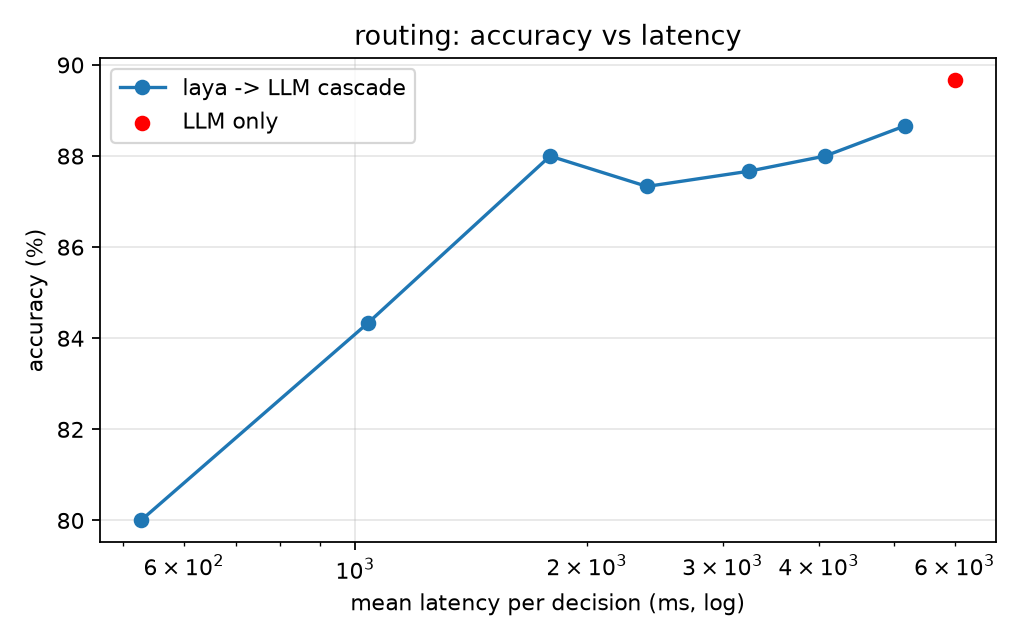
Laya returns a confidence for every decision, so I tried the obvious thing: let it answer when it's confident, and escalate to the LLM when it isn't.
| Escalate when confidence is below | Sent to the LLM | Accuracy | Mean latency | Speed-up vs LLM only |
|---|---|---|---|---|
| (LLM only) | 100% | 89.7% | 6,005 ms | 1.0x |
| 0.7 | 21% | 88.0% | 1,792 ms | 3.4x |
| 0.9 | 45% | 87.7% | 3,243 ms | 1.9x |
| Laya only | 0% | 80.0% | 528 ms | 11.4x |
Sending only about a fifth of decisions to the LLM costs 1.7 accuracy points and makes the whole thing 3.4x faster. That's the first result that looks like real unit economics.
Caveat: I picked thresholds on the same data I'm reporting, so treat this as promising, not proven. The section on the combined system below re-checks it out of sample.
Result 2: document types, where Laya struggled
| Laya | Laya (names only) | qwen3.5:4b | |
|---|---|---|---|
| Accuracy (n=300) | 51.7% (46.0–57.3) | 57.7% (52.0–63.1) | 81.7% (76.9–85.6) |
| Macro-F1 | 0.575 | 0.583 | 0.832 |
| Median latency | 1,703 ms | 1,632 ms | 6,568 ms |
| Calibration error | 0.342 | 0.284 | n/a |
On the full 1,002 pages Laya scores 51.4%. This is not close (p < 0.0001).
I didn't want to dismiss it on my first prompt, so I looked for a reason it might be my fault. That turned up the most useful finding of the whole study.
Laya has a hard 512-token input window, and the document and the option descriptions have to share it. Its output reports a truncated flag. With my 12-word descriptions per class, 68% of document decisions were truncated. The page was cut off, and so was the option text. I reran with label names only, with no descriptions, which cut truncation to 24% and raised accuracy to 57.7% (p = 0.03). That's a real improvement, but still 24 points below the LLM. So the gap is mostly a capability limit, not something I caused.
If you use a model like this, check the truncation flag. A silent cut-off is exactly the kind of thing that makes a benchmark look worse, or better, than it is.
Two more things stand out:
- Calibration breaks down at 12 classes (error 0.34). Laya warns about this itself when loading: the checkpoint ships invalid temperatures for questions with 11 or more options, and confidence should be treated as uncalibrated. That also ruins the cascade for documents: to get to 73% accuracy you'd escalate 58% of pages, and still trail the LLM's 82%.
- Class by class, it's uneven. Laya with names only is excellent on questionnaires (100%), scientific papers (100%), invoices (94%), specifications (94%) and resumes (87%), and weak on letters (24%) and news articles (27%). The LLM scores 100% on seven of the twelve classes. Handwritten is hard for everyone (Laya 9%, LLM 11%), because OCR of handwriting is close to noise. The biggest Laya confusions were handwritten → email (64 pages), letter → memo (53) and resume → email (40).
"Isn't that just Laya being under-trained?" Two cheap upgrades
Fair question, and the model card invites it: the base checkpoint I used is described as near chance on the vendor's own typed-decisions benchmark. So I tried the two upgrades that don't require training a model.
1. The typed-decisions checkpoint, which has a 1,024-token window and was trained on more kinds of decisions (invoice processing and customer service among them). Same inputs, zero-shot:
| Base Laya | Typed Laya | qwen3.5:4b | |
|---|---|---|---|
| Routing (n=300) | 80.0% | 84.3% | 89.7% |
| Tool-count sweep (n=160) | 84.4% | 90.6% | 96.2% |
| Document types (n=300) | 51.7% | 60.3% | 81.7% |
It helps, and significantly so on routing (p = 0.02) and documents (p = 0.0004). On short tool lists (2 to 4 tools) it's now slightly ahead of the LLM, 99.1% against 97.2%. It also fixed the "handwritten" class, going from 17% to 47% recall, while the LLM manages 11%. But it still trails the LLM on every task, and it isn't uniformly better: invoice recall fell from 77% to 59%, and it now misses more "no tool applies" cases (recall 61%, though when it does say "none" it's right 89% of the time). Latency didn't change.
2. Recalibrating the confidence. Laya lets you refit its confidence temperature on your own labelled examples without touching the weights. I fitted it on items disjoint from the test set (300 documents, 248 routing decisions). With few records the fit is a single scalar per task, because Laya's own rule needs 2,000 records per option-count bucket.
| Before | After | |
|---|---|---|
| Documents, base checkpoint (ECE) | 0.342 | 0.080 |
| Routing, typed checkpoint (ECE) | 0.184 | 0.061 |
Accuracy is unchanged by construction. What changes is that a confidence of 0.8 now means about 80%, so you can pick an escalation threshold from a target error rate instead of by trial and error. It doesn't move the cascade's speed-accuracy frontier, because it doesn't change which decisions Laya is more sure about.
With the typed checkpoint plus calibration, the routing cascade sends 24% of decisions to the LLM and reaches 88.7% accuracy, 3.0x faster than the LLM alone. The document cascade is a different story. Honest confidence reveals that Laya is unsure about roughly half the pages: escalating 47% of them gets to 77.7% accuracy, for only a 1.3x speed-up. Calibration made the numbers trustworthy. It didn't make the model good at this task.
What I still haven't tried is real fine-tuning, which is what the vendor says matters most. Nothing above can predict how it would turn out.
Each system alone vs the combined system
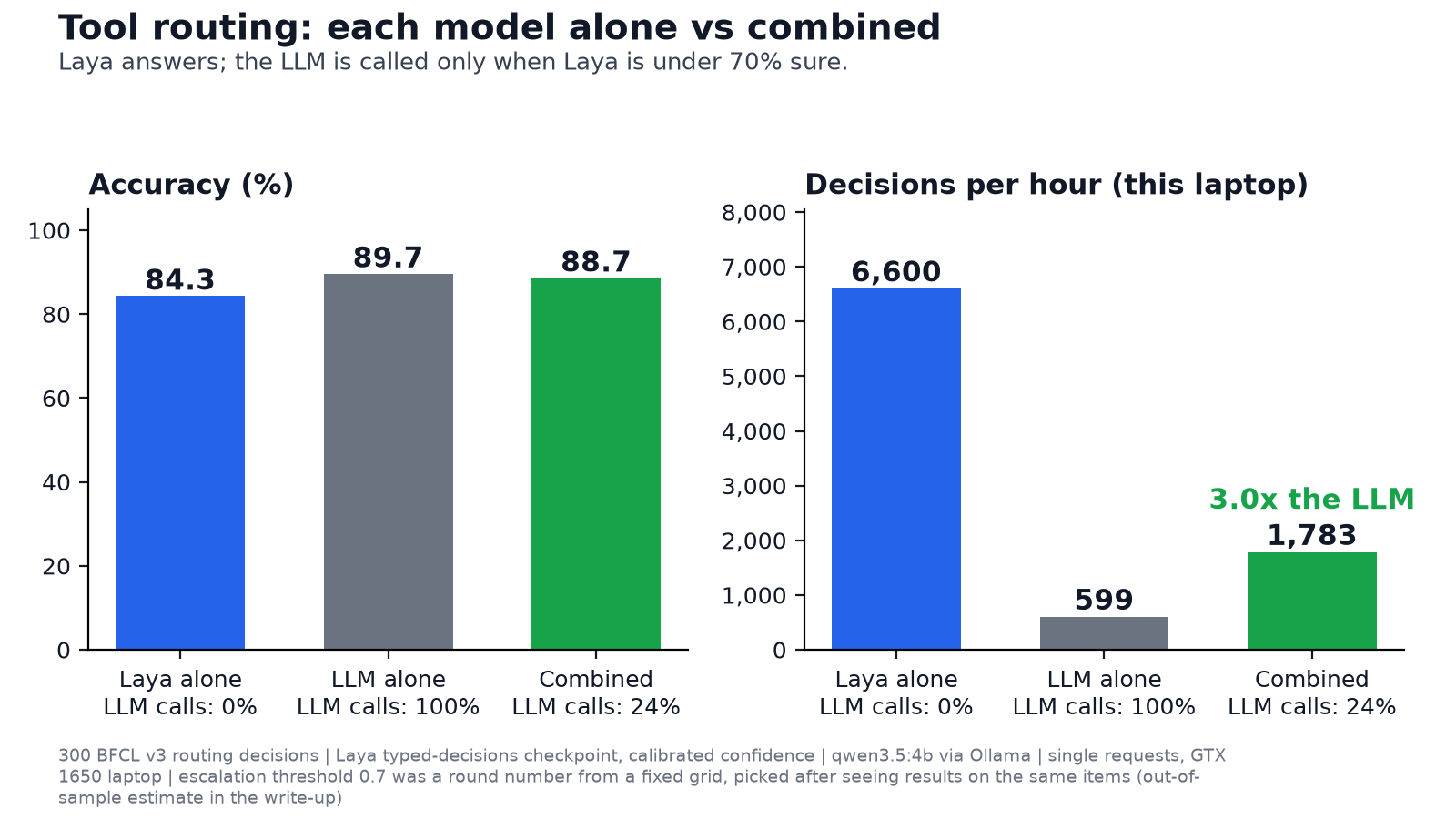
Putting it all together with the best Laya setup (typed checkpoint, calibrated confidence) and a fixed rule: Laya answers, and the LLM is called only when Laya's confidence is below 0.7.
Tool routing (n=300)
| Accuracy | Mean latency | Decisions/hour | LLM calls | |
|---|---|---|---|---|
| Laya alone | 84.3% | 545 ms | 6,600 | 0% |
| qwen3.5:4b alone | 89.7% | 6,005 ms | 599 | 100% |
| Combined | 88.7% | 2,019 ms | 1,783 | 24% |
The combined system is 3.0x the LLM's throughput. Against the LLM alone, the difference in accuracy is not significant (6 items only the combination got right, 9 only the LLM, McNemar p = 0.61), though 300 items can't prove they're equal. Against Laya alone it is a clear improvement (17 vs 4, p = 0.007).
The honest version of that number. I chose the 0.7 cutoff after looking at results on these same items, so I re-estimated it out of sample: pick the cutoff on a random half (the lowest one that stays within 2 points of the LLM there), score it on the other half, and repeat over 500 random splits. The combined system came out 2.6 points below the LLM on average (5th to 95th percentile: -6.7 to +0.7), 5.6x faster (1.7x to 9.3x), with 87% fewer LLM calls. A cutoff chosen on only 150 items is noisy, which is where the wide range comes from. The practical summary is: give up about 1 to 3 points of accuracy for 3 to 5x the speed, and choose the cutoff on a held-out set of your own.
Document typing (n=300)
| Accuracy | Mean latency | Decisions/hour | LLM calls | |
|---|---|---|---|---|
| Laya alone | 60.3% | 1,898 ms | 1,897 | 0% |
| qwen3.5:4b alone | 81.7% | 7,011 ms | 513 | 100% |
| Combined | 80.0% | 6,673 ms | 539 | 69% |
Here the combination recovers the LLM's accuracy, but only by sending 69% of pages to the LLM, so throughput barely moves (1.1x). The out-of-sample estimate agrees: 2.9 points below the LLM and 1.2x faster.
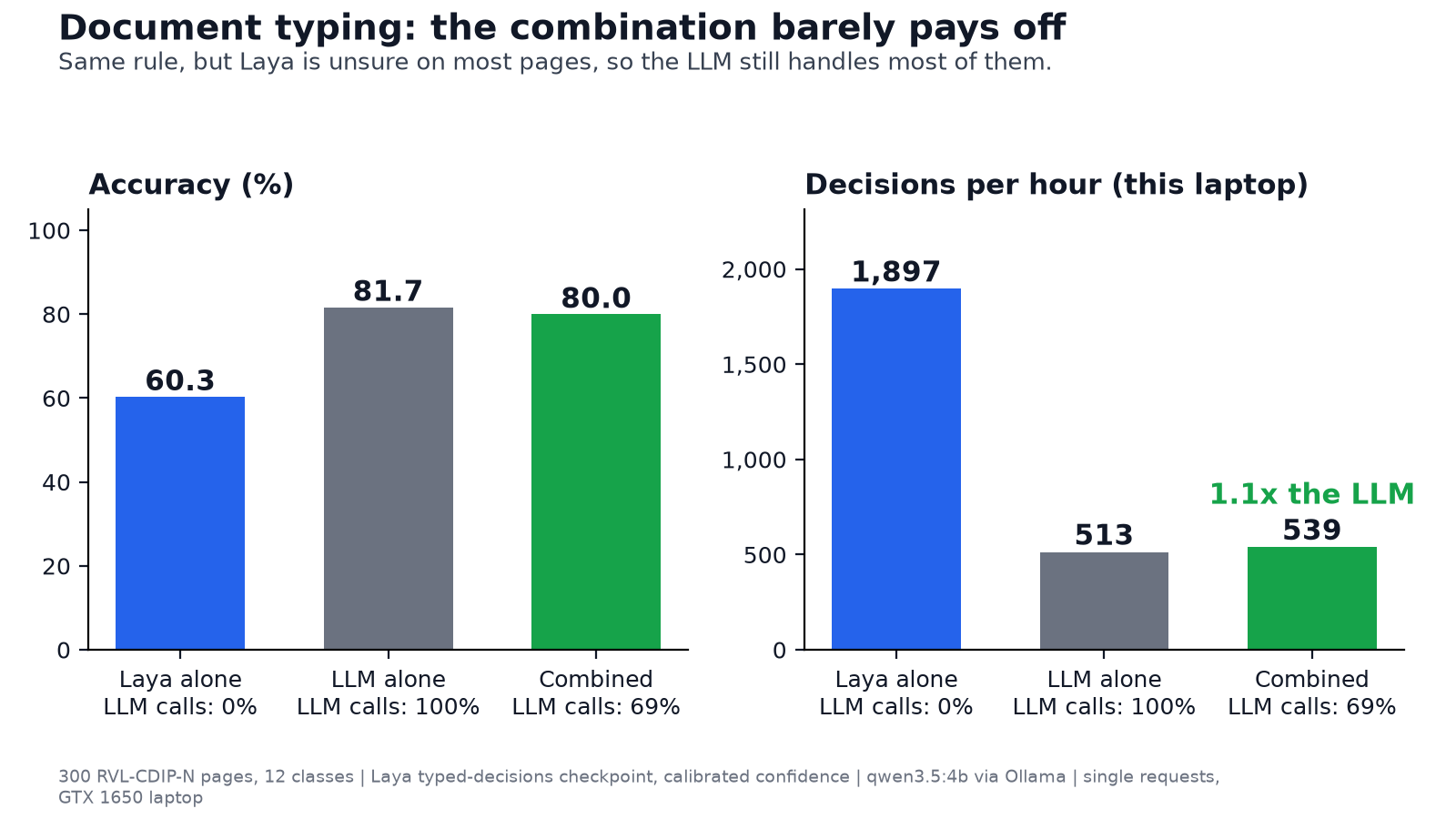
Why it works on one task and not the other. A cascade only saves time if the small model is confident on most decisions and right when it is. On routing, calibrated Laya is confident on about three quarters of requests. On documents it isn't, and calibration just makes that visible.
Things that went wrong along the way
- The Laya install failed once on network timeouts and DNS errors before it worked on retry.
- Its 804MB weights silently stalled at 3 of 5 files. Disabling Hugging Face's Xet transfer path fixed it.
- The dataset server's row API crashed trying to decode scan images, so I read the label and text columns directly.
- My first idea for the dataset was a set of fabricated support tickets. I threw it away. Made-up data is a bad foundation for a comparison.
Caveats
- Laya was never fine-tuned on my data. Everything here is zero-shot: the base checkpoint, the larger
typed-decisionscheckpoint, and a recalibrated confidence. Its model card says fine-tuning on your own decisions is where accuracy jumps (36.2% to 76.6% on the vendor's own benchmark). I haven't tested that, so these results describe out-of-the-box Laya, not Laya after adaptation. A fair fine-tuning test also needs a leak-free split, because consecutive pages of the same document are near-duplicates and I can't tell which pages share a source PDF. - One LLM (qwen3.5:4b). A different model, or a larger one, would change the picture.
- Hardware isn't symmetric. Laya ran on CPU; the LLM used the GPU with CPU offload. I did not test Laya on a GPU, so the published single-digit-to-low-double-digit millisecond figures are not something I measured. My CPU numbers are 0.5 s for routing and 1.7 s for documents.
- Single-request latency. I didn't test batching, which is where a small model could pull further ahead.
- Public benchmarks can overlap with training data for either model.
- Subsets of 300 keep the intervals wide, and I picked the "names only" variant after seeing the first result.
- Tool selection only. Filling in the arguments afterward is a separate problem.
What I'd take from it
- Routing is where a decision model earns its place, especially as a fast first pass with a confidence threshold and an LLM behind it. About 3x faster for about 2 points of accuracy is a trade many agent systems would take.
- Don't use it, as shipped, as your only document classifier. Twelve noisy-OCR classes is past what a 512-token, 421M-parameter model handles well, and its confidence stops being trustworthy there.
- Measure calibration and check for silent truncation before trusting any of it.
- "Faster" depends on what you compare against. The headline speed-up shrinks or grows with the hardware, the batching and the prompt length.
The point of a specialized model isn't to beat a general one. It's to make a trade explicit: some capability in exchange for speed and cost. The only way to know whether that trade is good is to measure it on your own task.
Reproduce it
Code, benchmark builders, every saved decision and the analysis script are in the repo: github.com/vyshakhgnair/laya-vs-local-llm. The datasets download with python src/fetch_data.py, and python src/analyze.py regenerates every table and chart here.
Models: Laya 0.4.12 (CPU) and qwen3.5:4b via Ollama. Cost: $0.